

Integration capabilities
@neuraltrust/n8n-nodes-trustguard
is a community node that connects
a workflow to a TrustGuard collector. It calls
/v1/evaluate and sends each item out of Allow,
Report, Transform or Block, so the verdict becomes a branch on the canvas
rather than a field the workflow must inspect.
This is a regular app node, not n8n’s built-in Guardrails node or a LangChain
sub-node attached to the AI Agent. The collector stores the policy, each verdict
includes a trace_id that appears in Activity, and transform rewrites the
payload before the next node.
Policy can also apply across the turns of a conversation rather than to one message
at a time, which takes two options the node does not set for you — see
Group the turns of a conversation.
Before you start
Create the policy in Observe mode. Observe records decisions in Activity without enforcing
them. Review the results, then switch the policy to Enforce. See
Policies.
Install the node
In n8n, Settings → Community nodes → Install a community node, and enter:Or on the host directly:
Create the credential
Add a NeuralTrust TrustGuard API credential before you add the node, so the node picks it up
on first open.
Test posts a one-word
protocol: all request to /v1/evaluate. A successful test confirms the
key, base URL, and network access before you add the credential to a workflow.Gate the input
Add NeuralTrust TrustGuard between the trigger and the AI Agent, with Operation set to
Evaluate Input:For a Chat Trigger workflow, connect the Block branch to a Set node that emits
output
from {{ $json.trustguard.blockedMessage }}. For a webhook workflow, connect it to a
Respond to Webhook node with status 403. The
webhook-403.json
template shows this configuration.Input Mode decides what gets sent:The role matters: an Output-phase rule scoped to
assistant, or an indirect-injection rule scoped
to tool, only fires if the message carries that role. Text prefills
{{ $json.chatInput }} on Evaluate Input and {{ $json.output }} on Evaluate Output.
Messages prefills {{ $json.messages }} and accepts a literal JSON array or an expression
that resolves to one. The node parses this value because n8n does not parse a json parameter
for a node.Scan the output
Add a second node after the AI Agent with Operation set to Evaluate Output. It sends
direction: output, so your Output-phase rules apply, and it prefills {{ $json.output }}.The node runs on a complete item, so an output-side block occurs before the next node. If the
workflow has already streamed the response, the verdict cannot prevent delivery of those tokens.Wire the four outputs
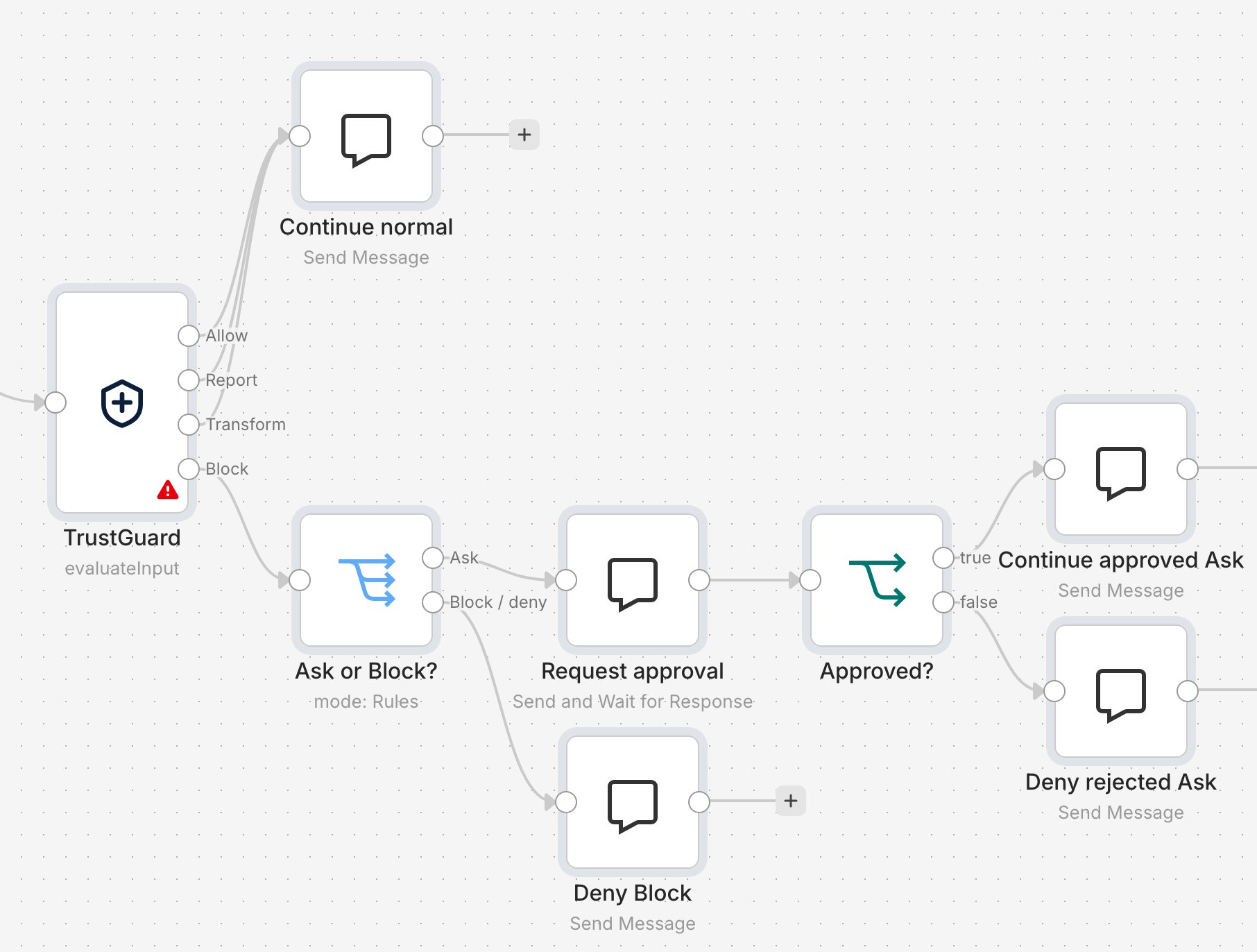
trustguard.status and sends ask items to an approval step.
Blocked requests do not enter that step.Download the Ask approval example
and import it into n8n. The warning on TrustGuard indicates that a credential
still needs to be assigned. The example ends with chat replies rather than
calling a model.When a participant responds, the approval node returns their decision, not the
original request. If you replace the approved reply with a model call, retrieve
the evaluated item from TrustGuard only on that approved branch. For an Ask
verdict, guardrailsInput still contains the block message; the original input
remains in chatInput or messages.Only
allow and skip reach Allow. Any unrecognized verdict reaches Block until the node supports
it.The workflow wiring enforces the verdict. Do not connect the Block output
back to the AI Agent unless you intend to monitor rather than block.guardrailsInput is the field the node writes the evaluated text to, on every branch: the masked
text on Transform, Blocked by NeuralTrust TrustGuard. trace_id=… on Block and on ask,
and the original text otherwise. It is the field to read downstream.Alongside the verdict the node writes a
trustguard object onto the item:findings is copied from every response that includes it, not only report responses.Wiring several outputs into one downstream node makes that node execute once per connected
output. To tally verdicts in one place, put a Merge node in between and set it to the number
of inputs you connect.Set the options
Options is an n8n collection that defaults to
{}. An option is not sent until you add it,
even when the interface shows a default. The Default column shows the value inserted when you
click Add option.Add Session ID so TrustGuard can evaluate a conversation instead of isolated messages. See
Group the turns of a conversation for what to point it at,
which is not always the prefilled expression. Add Consumer ID if the collector has
per-consumer policy overrides, or every request resolves to the
default policy. In a chat workflow, use the trigger’s authenticated user. Protocol should stay
llm for chat workflows.Group the turns of a conversation
A multi-turn attack spreads its intent across several messages. Each one reads as harmless on its
own; the escalation, the reinforcement, or the reassembled instruction exists only across turns.
See multi-turn attacks
for the techniques involved — Crescendo, Echo Chamber, Multi-Turn Manipulation, and Payload
Splitting. Their common target is a check that inspects each message independently, which is what
the node does until you give it the conversation.Two inputs give TrustGuard the conversation, and they are complementary rather than alternatives:
Neither happens by default.
/v1/evaluate
synthesizes a session_id when the field is omitted, so a
workflow that never sends one produces one session per request. Nothing errors and no finding goes
missing, so the gap is only visible as single-turn conversations in Activity.Point Session ID at a key that survives the workflow
The Session ID option is per node. Add it on every TrustGuard node in the workflow — each one reads its own Options collection and builds its own request body — and point each at an expression that actually resolves at that point on the canvas.Align the value with your memory node’s session key so the conversation TrustGuard groups and the
conversation the agent remembers are the same one. Every n8n chat-memory node exposes
Session ID as either Connected Chat Trigger Node or Define below; whichever expression
it resolves, use the same one in the TrustGuard option.
{{ $execution.id }} and {{ $workflow.id }} are not conversation keys. A chat turn is one
execution, so the first changes every turn, and the second is shared by every conversation in the
workflow.Give one call the history
Set Input Mode to Messages and point the Messages parameter at an assembled OpenAI-style array. The node sends it verbatim aspayload.messages, so one evaluation call
carries the conversation, with tool_calls and tool results intact.Build the array in a Code node from whatever your workflow already stores. To read an
attached memory node’s history onto the main path, use a Chat Memory Manager node in
Get Many Messages mode, then map its output in a Code node: its entries are keyed by sender
(human, ai, system) rather than by role, and the node fails closed on an array whose
items have no role.The whole transcript is re-sent and re-scanned on every turn, and the node evaluates one item per
call. In Messages mode the node writes its own normalized array back to json.messages on every
branch, not only on transform, so a downstream node that appends the next turn is reading the
node’s copy rather than the one it assembled.Verify
With a jailbreak rule in Enforce mode, run the workflow with:The item should leave on Block, and the AI Agent should not run.
trustguard.trace_id on the
blocked item is the same identifier the finding carries in Activity, so use it to reconcile a
run with what the console shows. Then check the inverse: an ordinary prompt leaves on Allow
and reaches the agent.Reference
Coverage
Use the node when a policy verdict should determine an explicit branch in an n8n workflow.
Model traffic outside a workflow that contains the node is not covered; use a
gateway for broader enforcement.
Ask. Routed to Block because the node cannot prompt a user during execution. From
0.2.0, the node recognizes the verdict and routes it. Earlier versions fail the item because
they do not recognize
ask.
Limits. Block and redact depend on the workflow wiring. Tool coverage includes only what the
graph makes explicit. There is no hook inside an AI
Agent node’s own loop, so a tool call cannot be gated before it executes the way the
LangChain middleware gates one. Transform rewrites text and tool-call
arguments only: tool name and call id values are checked against the request and never changed, a
transformed tool call is re-emitted in OpenAI {id, type, function} form, a call that arrived
without an id cannot be transformed, and a non-text content part cannot be masked. The node
fails closed if it cannot apply the complete transformation safely.
What is evaluated
Both operations call
POST /v1/evaluate with the credential’s tgk_…
key, and the policy’s detectors decide the verdict. There is no
event inside the AI Agent loop to hook, so a tool call the agent makes on its own is not seen. It is
covered only if you assemble it into a Messages array and evaluate that payload.
Each guarded direction is one round trip, and the node evaluates items one at a time: a batch of
50 items is 50 calls.
Configuration
Fail-closed is the default. Fail Open on Unreachable applies only to connection errors, timeouts, HTTP 502/504 responses, and HTTP 429 responses after retries are exhausted. Those are retried first: three attempts in total. An HTTP retry honorsRetry-After up to 5s; a
transport error has no header to read, so it always backs off 0.25s then 0.5s. Timeout is per
attempt, so a 5s timeout over three attempts can hold an execution open for more than 15s before
the item fails.
The following cases fail closed even when fail-open is enabled:
- HTTP 401/403, and 503 entitlement failures
- any other 4xx/5xx
- a non-JSON
200, or a verdict this version of the node does not recognize - a
transformed_payloadthat cannot be applied safely - an empty or unresolved Text expression
- TLS and certificate failures. An untrusted certificate looks like a connect error, but it is a configuration fault rather than an outage, so fail-open does not cover it. A corporate MITM proxy without a trusted CA will therefore fail every item.
code on the cause chain (ECONNREFUSED,
ENOTFOUND, ETIMEDOUT, and similar values) as well as from the message text because n8n can
rewrite those codes before the node receives them.
On Error. Fail Open on Unreachable is scoped to transport failures. n8n’s own
Settings → On Error applies to all node errors and can change where failed items are routed:
No On Error setting can put an unevaluated item on Allow. Failures route to Block, which
n8n still relocates to the error output when that mode is selected. Filter on
trustguard.evaluated === false to find every item that reached a branch without being evaluated.
It is set both on a fail-open Allow item and on a Block-routed failure.
Attributes
protocol, attributes.content_type, and attributes.model.name are sent on every request.
When Model Name is blank, attributes.model.name is an empty string. collector_key,
consumer_id, session_id, and attributes.model.provider are sent only when set — meaning the
option was added and its expression resolved to a non-empty value. Each node builds its own
body, so an option set on one TrustGuard node does not apply to another. See
Group the turns of a conversation.
workflowId, workflowName, and executionId are output metadata only. They are added to the
item for correlation and are not sent in the evaluation body because /v1/evaluate rejects
unknown top-level keys with a 400.
As an AI Agent tool
The node setsusableAsTool, so n8n also offers it as a tool an AI Agent can call. That path is
built for reporting, not enforcement.
Templates
If you can install the node,examples/ holds nine
importable workflows covering each operation, option, output, and failure mode. Start with
01-input-gate-four-verdicts.json.
For instances where installing a community node is not an option, including n8n Cloud until the
node is verified, the node repository also
ships three workflows built from HTTP Request + Switch that call the same endpoint:
Attach a Header Auth credential (
Authorization: Bearer tgk_…) after importing. Do not paste a key
into the workflow JSON because it is stored unencrypted and included in every export.
Troubleshooting
Related
- Policies: Gates: configure Ask and Block actions
- Evaluate API: request and response reference
- Detectors: configure the checks that produce verdicts
- LangChain: evaluate tool calls before execution
- TrustGate MCP: apply policies to MCP tool traffic outside the n8n node
- How it works: compare available collectors
NeuralTrust/n8n-nodes-trustguard: source, releases, and issues- n8n community nodes: installation reference